Why Your Offline Conversions Aren't Improving Campaign Performance
The offline conversion setup is done. Events are showing up in Google Ads. Match rate looks reasonable — somewhere in the 50–60% range. Three months later, Smart Bidding hasn’t visibly changed its behavior and campaign performance is flat. What’s wrong?
This situation is more common than the documentation suggests. Completing the technical integration is necessary but not sufficient. Smart Bidding has specific requirements around volume, timing, and data structure before it will use offline conversions as an optimization signal. When any of those requirements aren’t met, the events arrive in Google Ads but remain algorithmically inactive — present in reports, invisible to the bidding engine.
Four Reasons Offline Conversions Don’t Move the Needle
Low Match Rate Below the Functional Threshold
A 50% match rate sounds like “half is better than nothing.” In practice, it often isn’t enough. If a client closes 18 deals per month and the match rate is 50%, Google Ads receives 9 attributed conversions per month. That’s below the 30 conversions per month per conversion action that Google recommends for reliable Smart Bidding optimization.
Smart Bidding with insufficient volume enters conservative mode. It recognizes there isn’t enough data to make reliable predictions and effectively continues operating on whatever higher-volume signal it has — typically, pixel-based form fills.
Check match rate in the Enhanced Conversions diagnostic report. Below 65% with GCLID present indicates an upstream problem — GCLID capture at the form, or PII normalization before hashing. For a detailed diagnostic of why match rates collapse, see Offline Conversion Match Rate: How to Get from 35% to 70%+.
Events Submitted Too Late
Google Ads accepts offline conversions up to 90 days after the click. But there’s a practical effect: events submitted 60–80 days after the click arrive too late to influence bidding on campaigns running today.
Smart Bidding is prospective — it uses conversion history to predict which future clicks will convert. When most of your events arrive with 45–60 day lag, the signal exists, but it isn’t available when the algorithm is making real-time bid decisions.
For long sales cycles, some latency is structural — the cycle can’t be shortened. But the delay between deal close and event submission is fully controllable. With manual CSV uploads, the gap between close date and upload date is often 7–21 days. With automatic webhook submission, it’s minutes. Automating the upload with a chain of Zaps narrows the gap without closing the reliability problem — what breaks in a DIY Zapier pipeline is a separate cost worth understanding before you build one.
Insufficient Volume Per Conversion Action
The 30 conversions per month threshold is per conversion action, not per account. If you have 10 B2B clients configured to report to the same conversion action, you might have 300 conversions per month in aggregate — but if each client’s deals are distributed across multiple campaigns targeting different keyword sets, per-campaign volume may be too low for reliable optimization.
The ideal structure: one conversion action per type of event Smart Bidding should optimize toward. For a B2B client with a 30-day sales cycle and 15 deals per month, you’re at the threshold. For clients closing fewer than 10 deals per month, Smart Bidding likely doesn’t have enough volume to shift budget allocation based on offline conversions consistently.
In these cases, the realistic approach is to use offline conversions as a secondary optimization signal — keep pixel-based form fills as the primary conversion action (higher volume), and use closed deals as a quality signal for manual bid adjustments by campaign.
Wrong Conversion Action Type
The conversion action receiving offline events must be type “Import from clicks.” If configured as “Website” or “App,” Google Ads will accept uploads without errors — but won’t process events as attributable to paid ad clicks.
This failure is silent: the upload returns no error, events appear in the conversion report, but the “Attributable to ad” flag stays at zero. Smart Bidding never touches this data.
Check under Tools > Conversions: the conversion action type must show “Imported click” or equivalent. If it shows “Other” or “Website,” the conversion action is misconfigured for offline conversion data.
Diagnostic Checklist
If offline conversions aren’t moving Smart Bidding, go through this checklist before making any other changes:
| Item | How to check | What to look for |
|---|---|---|
| Match rate | Enhanced Conversions diagnostic report | Above 65% with GCLID present |
| Monthly volume | Conversion report filtered by conversion action | Above 30 per month |
| Upload latency | Click date vs. upload date in conversion report | Under 7-day average gap |
| Conversion action type | Tools > Conversions | ”Imported click” |
| GCLID in CRM | Custom field on lead records | Present on >70% of leads |
An event log that reports delivery status per platform shortens this checklist considerably — a row marked as failed for Google is a different problem from a row that was delivered but never matched:
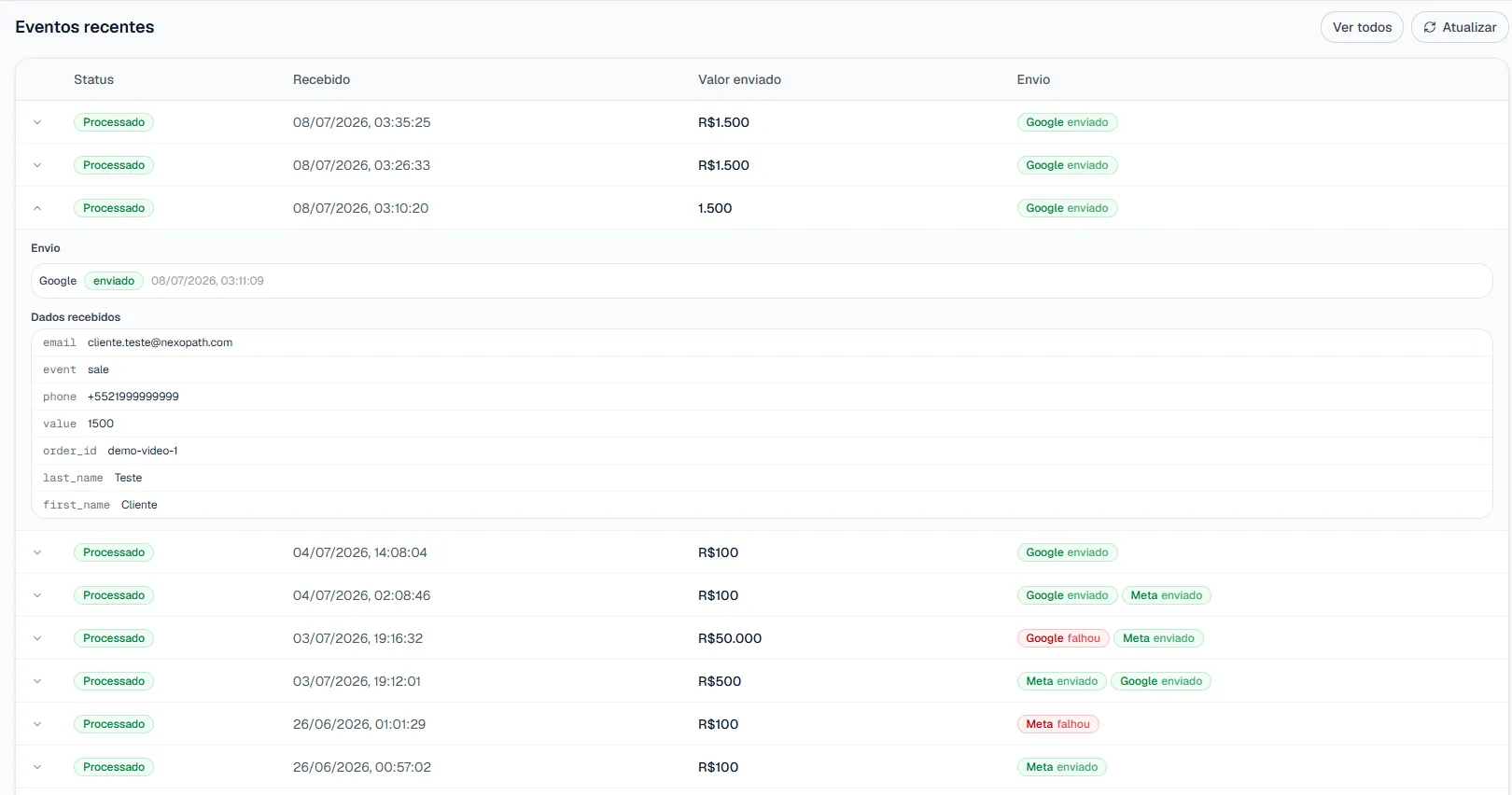
If all five items check out and Smart Bidding still isn’t responding after 8 weeks, the issue is likely volume — the client simply doesn’t close enough deals per month for the algorithm to have a reliable signal.
What “Improvement” Actually Looks Like
Miscalibrated expectations explain a portion of the disappointment. Here’s what to realistically expect:
What will change: budget distribution across campaigns, over 4–12 weeks. Campaigns generating real deals but appearing inefficient (because conversions were invisible) start gaining impression share. High-volume click campaigns with low deal-close correlation lose budget gradually.
What won’t change immediately: reported ROAS. It may drop initially, because the algorithm is shifting to optimize for a rarer, higher-value event (closed deal, $8,000) instead of a more frequent proxy (form fill, $0 or nominal value). The right comparison metric is cost per closed deal before and after — not ROAS before and after.
What won’t change regardless: the client’s deal volume. Offline conversions improve signal quality — they don’t generate demand that doesn’t exist. If the client’s market is limited in size, Smart Bidding will allocate the available budget more efficiently, but it won’t create demand.
A Concrete Example
An agency managing a B2B SaaS client with $30,000/month in Google Ads spend. The client closes 12–18 deals per month via CRM. With offline conversions configured via manual CSV uploads (average 21-day lag), match rate was 47% — producing 6–8 attributed conversions per month. Smart Bidding continued optimizing toward form fills.
After switching to automatic webhook submission (lag reduced to minutes) and fixing phone normalization (match rate increased to 73%), attributed conversions rose to 9–13 per month. Still below the ideal threshold of 30, but sufficient for Smart Bidding to begin adjusting.
Over 10 weeks, a long-tail keyword campaign — higher CPC, lower volume, but producing above-average deal sizes — started gaining impression share. Cost per closed deal dropped 16% with no budget increase. Reported ROAS dropped 9% (deals have lower per-conversion value than form fills in the prior model). The client’s revenue results improved.
For context on how this connects to the broader attribution problem in B2B campaigns, see The B2B Attribution Gap: Why Google Ads Is Starving Your Best Campaigns.
The Two Variables You Can Actually Control
Of the four failure modes described above, two are fully within your control regardless of client characteristics:
Upload latency — switch from manual to automatic webhook-based submission. The lag goes from 7–21 days to minutes. This doesn’t require changing anything about the client’s sales process.
PII normalization and hashing — correct email and phone normalization before SHA-256 hashing. Wrong normalization produces wrong hashes, wrong hashes produce zero matches, and low match rate keeps you below the volume threshold even when the deal volume is adequate. Both variables are handled at the integration layer rather than in code — the configuration path is in the agency guide to enhanced conversions without a developer.
The other two — conversion action configuration and deal volume — are either one-time fixes (wrong conversion action type) or structural limitations that middleware can’t solve (insufficient deal volume).
Next Step
True Conversions addresses the two most controllable variables: upload latency (webhook submission in minutes) and PII normalization (automatic hashing with Google’s normalization rules applied correctly). If you have offline conversions configured but Smart Bidding isn’t responding, those two checkpoints are worth diagnosing before any other changes. Learn more at conversions.nexopath.com. Free trial available.
Frequently Asked Questions
Why aren't my offline conversions improving campaign performance?
There are four common causes: a match rate below the functional threshold, events submitted too late, insufficient volume per conversion action, and the wrong conversion action type. In each case the events arrive in Google Ads but stay algorithmically inactive — present in reports, invisible to the bidding engine.
How many offline conversions per month does Smart Bidding need?
Google recommends at least 30 per month per conversion action, and the threshold is per conversion action, not per account. Below it, Smart Bidding enters conservative mode and keeps operating on whatever higher-volume signal it already has — typically pixel-based form fills.
What conversion action type do offline conversions require?
It must be "Import from clicks". If it is set to "Website" or "App", Google Ads accepts the upload without errors but never processes the events as attributable to paid clicks — the attributable-to-ad flag stays at zero and Smart Bidding never touches the data.
Should reported ROAS go up after enabling offline conversions?
Not necessarily — it may drop at first. The algorithm shifts to optimizing for a rarer, higher-value event (a closed deal) instead of a more frequent proxy (a form fill worth zero or a nominal value). The right comparison is cost per closed deal before and after, not ROAS before and after.