The Agency Guide to Setting Up Enhanced Conversions Without a Developer
Most agencies know they should have Enhanced Conversions set up for B2B clients. Most don’t. The reason is almost always the same: “we need a developer for that.”
That’s not entirely wrong. Native Enhanced Conversions implementation for offline conversions requires a CRM webhook endpoint, SHA-256 hashing logic, Google Ads API authentication, and retry handling for delivery failures. That’s developer work — if you’re building it from scratch.
The problem is that most performance agencies don’t have a developer. They have media analysts, Google Ads specialists, account managers. Data infrastructure gets deprioritized — or never happens — while Smart Bidding keeps optimizing toward form fills instead of closed deals, and client campaigns underperform in ways that are hard to diagnose.
What Enhanced Conversions Actually Does
Enhanced Conversions is the mechanism that lets Google Ads receive conversion data that occurs outside the browser environment — or that the pixel can’t capture.
For B2B clients, the primary use case is submitting CRM deal-won events as conversions to Google Ads. The flow:
- A prospect clicks an ad. The Google Click ID (GCLID) is in the URL.
- The lead form captures the GCLID and stores it in the CRM alongside the contact record.
- The sales cycle runs — days, weeks, months.
- The deal closes in the CRM.
- A conversion event is submitted to Google Ads with the GCLID and the deal value.
- Smart Bidding learns that the click profile which generated that lead also produced actual revenue.
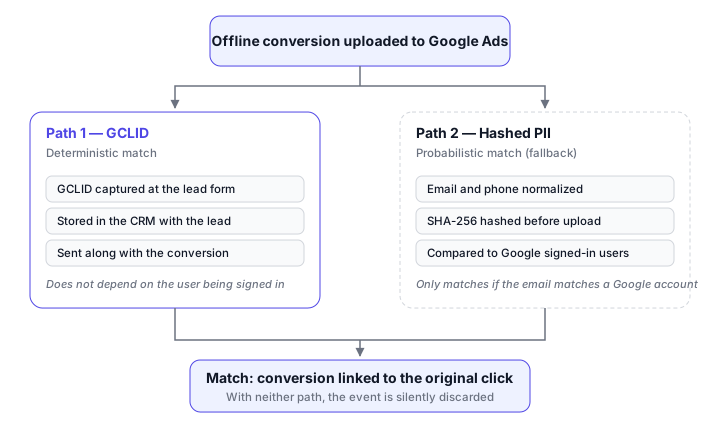
Without this, Smart Bidding sees only the form fill from step 2 — if the pixel fired, if the user wasn’t on Safari, if they had no ad blocker active. With server-side Enhanced Conversions, the signal arrives independently of those variables, weeks or months after the original click. Why the browser-side event became unreliable in the first place is the subject of server-side tracking vs. pixel tracking.
Why Native Implementation Stalls Agencies
What native implementation concretely requires:
CRM webhook — when a deal transitions to “closed/won,” the CRM needs to make an HTTP call to an endpoint. That endpoint needs to exist somewhere. Someone needs to build and host that server.
PII normalization and hashing — Google requires email and phone to be normalized (lowercase, trimmed, E.164 format for phone) and then SHA-256 hashed. A normalization error produces a different hash than what Google has on file, and the match fails silently — no error reported, no conversion counted.
Google Ads API integration — the event must be sent to the correct endpoint, with the correct parameters, in the correct format, with valid OAuth2 authentication. Tokens expire and need to be refreshed.
Retry and deduplication — if the API returns a transient error, the conversion needs to be retried. If the webhook fires twice for the same deal, the conversion must not be duplicated.
Estimated timeline for a developer with no prior experience on this API: 2–4 weeks of focused work. For an agency trying to implement this for five clients simultaneously, that’s a 2–4 month project or an expensive consultancy engagement.
The usual escape hatch is to wire the whole thing together in Zapier and skip the developer entirely. It works, up to a point — but the per-task pricing and the silent failures of DIY CRM-to-Google pipelines tend to surface only once several clients are running on it.
What Middleware Replaces
A dedicated middleware — like True Conversions — is a product that already has this infrastructure built. The agency configures the integration, not the code.
What the setup requires from the agency:
1. Connect the CRM — for RD Station CRM, there’s a native connector: paste the API token and True Conversions auto-registers the webhooks and lists pipelines and stages for you to pick from dropdowns. For ActiveCampaign, Pipedrive, HubSpot, or any other system, the connection is a generic webhook URL that True Conversions provides — paste it into the CRM’s automation and map the fields in the dashboard.
2. Map the GCLID field — specify which custom field in the CRM stores the GCLID. The middleware reads this field when the deal closes.
3. Select the conversion stage — which pipeline stage represents “closed/won.” The middleware monitors transitions to that stage.
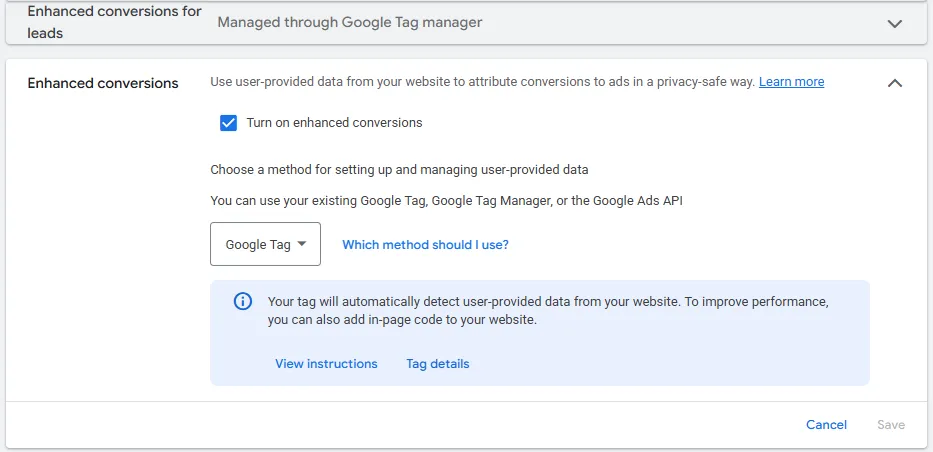
4. Connect Google Ads — OAuth authorization with the Google Ads account. The conversion action must already exist: create it in Google Ads as type “Import,” with enhanced conversions for leads enabled, then select it in True Conversions. The middleware does not create the conversion action for you.
The enhanced conversions toggle lives in the Google Ads conversion settings, next to the method selector:
5. Test — move a test deal to the closed stage. Check the conversion in the Google Ads conversion report 4–6 hours later (Google’s ingestion delay, not the middleware’s).
When the setup is complete, the client screen reports the state of each step — CRMs connected, ad platform connected, fields mapped, value optimization on, and the first conversion sent:
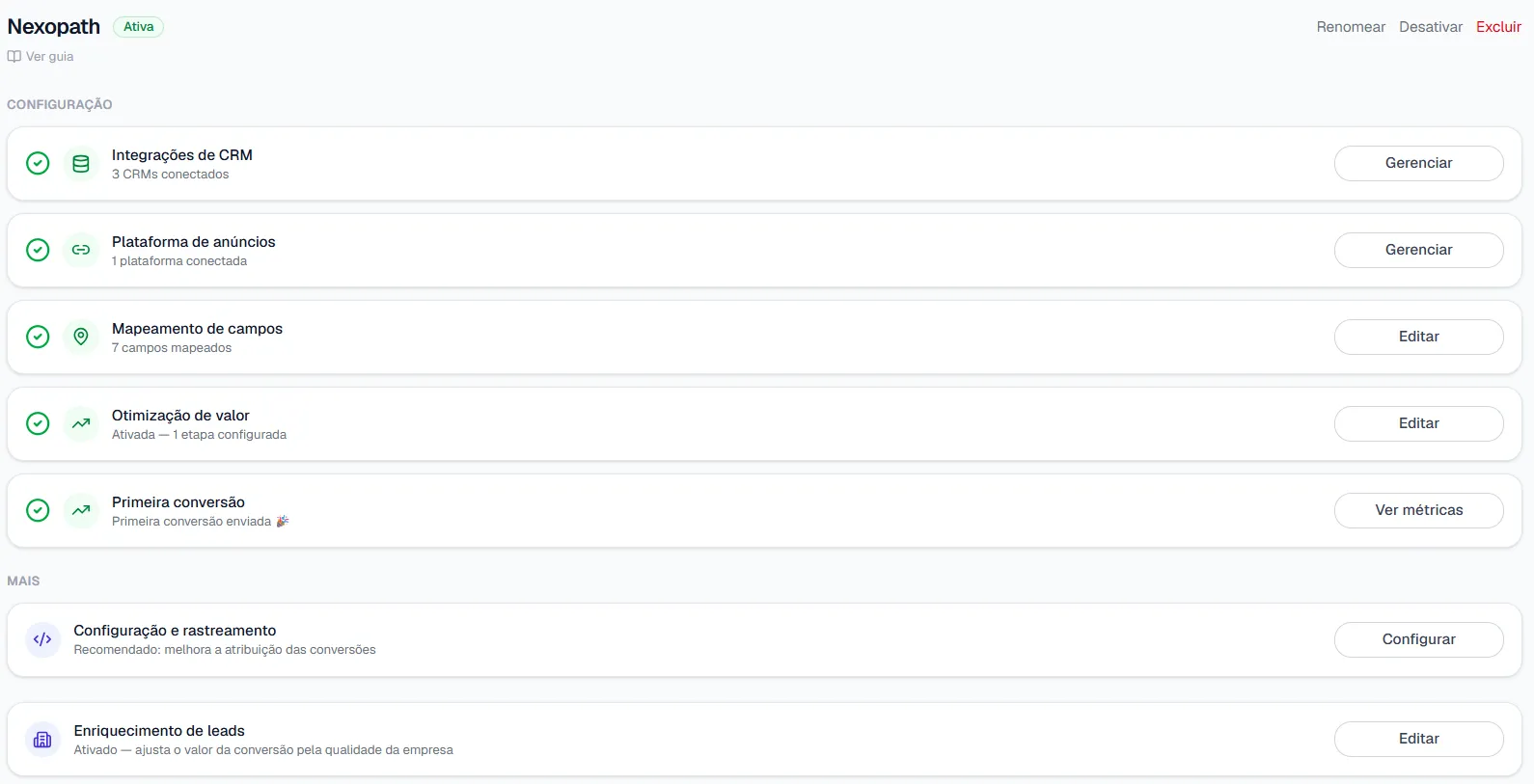
Total time: under 30 minutes for a media analyst following the setup documentation. No terminal, no manually copied API keys, no server infrastructure.
A Conceptual Walkthrough: What Happens at Each Step
Step 1: GCLID Capture
The GCLID must be in the CRM before any other configuration makes sense. Verify that the lead form on the landing page captures the gclid URL parameter and passes it into the CRM as a custom field.
Most third-party form tools (HubSpot Forms, Typeform, Calendly) support hidden fields populated from URL parameters. If this isn’t configured, match rate will stay at 40–60% even when everything else is working — because the match falls back to hashed PII, which is less reliable than GCLID. True Conversions offers a free script (tc.js) that automates this capture: one line on the site fills the hidden fields with the GCLID (and wbraid/gbraid/fbclid) automatically, no form rework required. For a detailed breakdown of why GCLID matters and how to diagnose match rate issues, see Offline Conversion Match Rate: How to Get from 35% to 70%+.
Step 2: Webhook Configuration
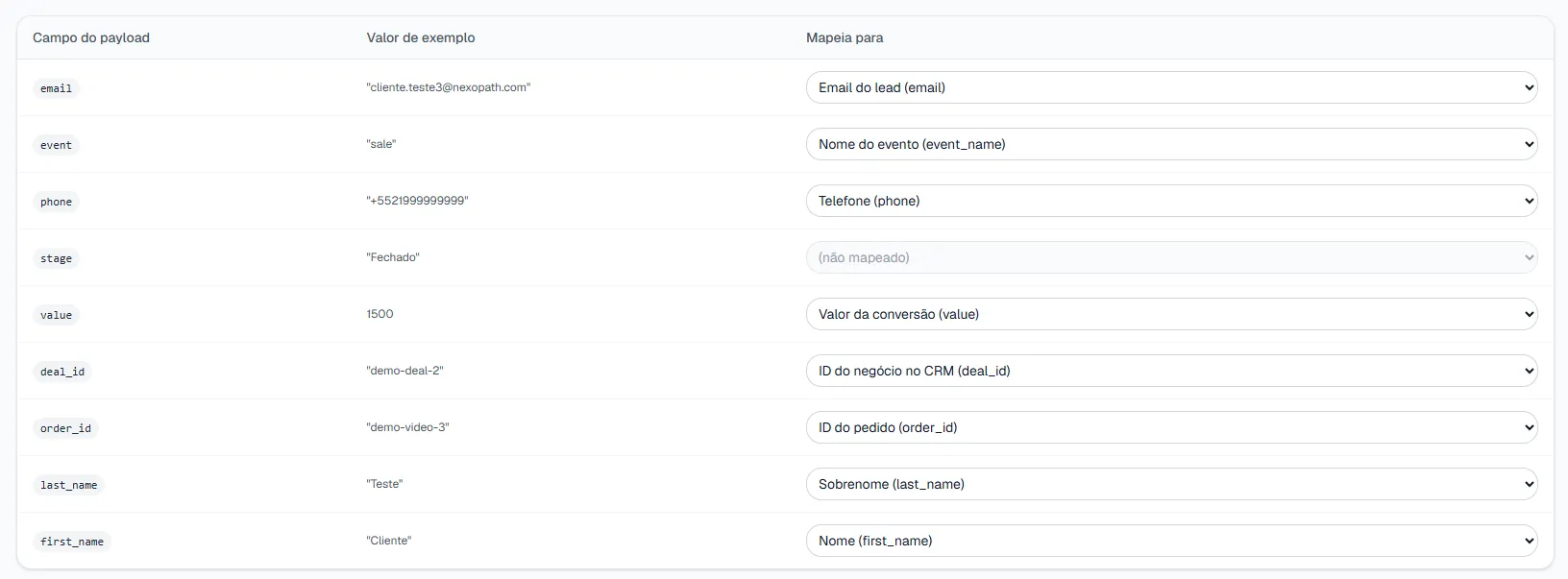
With middleware, this step is transparent. The product already has the endpoint configured; the agency just authorizes the integration. Without middleware, this is the step that requires a developer — a webhook receiver is a server that needs to be built, hosted, secured, and maintained.
Mapping happens in a table: each field in the payload the CRM sends is bound, via dropdown, to the corresponding True Conversions field.
Step 3: PII Hashing
The middleware applies normalization and SHA-256 hashing automatically. The CRM sends raw data (email, phone, name) in the webhook payload; the middleware normalizes and generates hashes before any transmission to Google.
Raw PII never leaves the middleware infrastructure. Google receives only the hashes — which are cryptographically irreversible by design.
Step 4: Google Ads API Submission
The event is structured with the required fields:
conversion_action— the ID of the specific conversion actiongclid— the Google Click ID from the lead recordconversion_date_time— the timestamp when the deal closedconversion_value— the deal value in the account currencyuser_identifiers— array of hashed email and hashed phone
The middleware handles OAuth authentication, retry on transient errors, and deduplication if the CRM webhook fires more than once for the same deal.
What to Expect in the First Weeks
Week 1–2: events arriving in Google Ads. Validate the match rate in the Enhanced Conversions diagnostic report. Above 60% with GCLID present is expected; above 80% is the target with consistent GCLID capture.
Week 3–8: data accumulating. Smart Bidding doesn’t yet have sufficient volume to shift budget allocation — Google recommends a minimum of 30 conversions per month per conversion action before adjusting bidding strategies toward offline events.
Month 2–3: campaigns generating deals but receiving insufficient budget start gaining impressions. Campaigns generating form fills with no deal correlation start losing. Reported ROAS in the dashboard may drop. The client’s CRM pipeline results should improve.
A step beyond the closed deal: with value rules, Google gets a value signal weeks before the deal closes — lead, meeting, proposal, and won, each stage restating a larger share of the deal’s expected value.
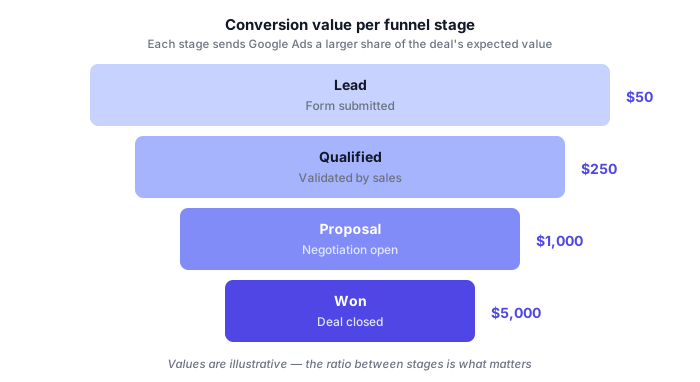
See how this is configured in Value per funnel stage.
A Note on Conversion Action Setup
One setup mistake that breaks the entire integration: the conversion action in Google Ads must be of type “Import” (also called “Offline import”). If it’s set to “Website” or “App,” the Google Ads API will reject the submission with an error that’s easy to miss if you’re not checking the API response directly.
Check this manually on the Google Ads side before going live with a client: navigate to Tools > Conversions, find the conversion action, and confirm the “Category” shows “Import from clicks” or equivalent.
Next Step
True Conversions replaces months of development with a 30-minute integration. Connect the CRM, map the fields, select the conversion stage — and deal-won events start arriving in Google Ads as server-side offline conversions, with correct hashing and GCLID included. No code, no server, no developer. See how the server-side infrastructure works. Free trial available.
Frequently Asked Questions
Do I need a developer to set up Enhanced Conversions?
No. Native implementation requires a CRM webhook, SHA-256 hashing, Google Ads API authentication, and retry handling — 2 to 4 weeks of developer work. With a middleware, the agency configures an integration instead of a codebase: connect the CRM, map the GCLID field, select the closed-won stage, and connect Google Ads.
How long does the setup take?
Under 30 minutes for a media analyst following the setup documentation. No terminal, no manually copied API keys, no server infrastructure to host.
Do I need to create the conversion action in Google Ads myself?
Yes. It must already exist, created in Google Ads as type "Import" with enhanced conversions for leads enabled. The middleware does not create the conversion action for you — it only lists the existing ones for you to select.
When do results start showing up in campaigns?
In weeks 1 and 2, events arrive and you validate the match rate. Between weeks 3 and 8, data accumulates — Google recommends a minimum of 30 conversions per month per conversion action before it adjusts bidding. From month 2 or 3, budget starts shifting toward the campaigns that produce closed deals.