The Zapier Tax: Why DIY CRM-to-Google Pipelines Are Destroying Agency Margins
The Apparent Solution
The first thing an agency does when they realize they need to push CRM deal-won events to Google Ads is search for a Zapier template. They find one. It’s rated 4.5 stars. They set it up in an afternoon. It works.
For the first two weeks.
The problem with Zapier-based CRM-to-Google pipelines isn’t that they’re technically wrong. It’s that they’re built to be fast to set up, not reliable at scale — and the failures are the kind that don’t produce error messages until someone’s reviewing last quarter’s attribution data.
How the Zapier Workflow Actually Works
A typical Zapier workflow for pushing ActiveCampaign or Pipedrive deal-won events to Google Ads looks like this:
- Trigger: CRM webhook fires when deal stage changes to “Won”
- Step 1: Formatter — normalize email to lowercase, strip whitespace
- Step 2: Code by Zapier — JavaScript to SHA-256 hash the email and phone
- Step 3: Google Ads — upload offline conversion using the hashed data
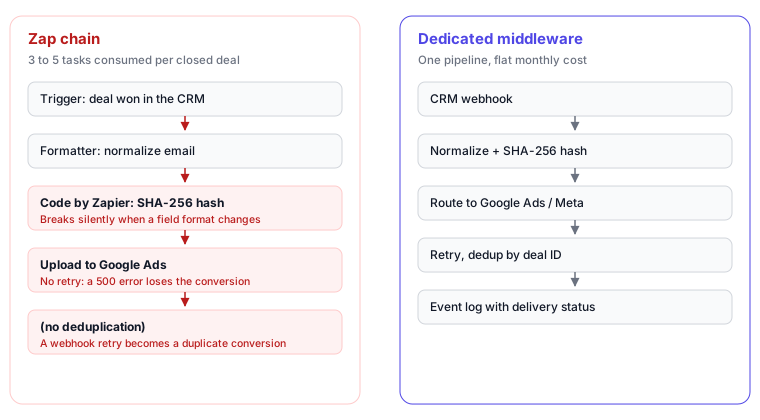
This is 3-5 Zapier steps per deal-won event. On a Pro plan ($49/month), you get 2,000 tasks. On a Team plan ($103/month), 50,000 tasks. Each step consumes one task.
At 5 tasks per deal and 400 deals/month, you’re consuming 2,000 tasks — the entire Pro plan — on a single workflow.
The Cost Calculation at Scale
Most agencies don’t price the Zapier overhead into their service margins when they set up these workflows. They set it up for one client, it works, and they replicate it across the portfolio.
The math at scale:
| Clients | Avg deals/month | Tasks/deal | Monthly tasks | Zapier plan needed | Plan cost |
|---|---|---|---|---|---|
| 5 | 50 | 5 | 1,250 | Pro | $49 |
| 10 | 50 | 5 | 2,500 | Pro (overage) | $49 + overages |
| 10 | 100 | 5 | 5,000 | Team | $103 |
| 20 | 100 | 5 | 10,000 | Team | $103 + overages |
| 20 | 200 | 5 | 20,000 | Enterprise | $~400+ |
These numbers assume each client has their own Zapier account, which is the cleanest setup. If the agency runs a shared Zapier account across clients (common for smaller agencies), task consumption from one high-volume client can throttle all other clients in the same billing cycle.
The Zapier cost is a direct operational expense that scales with client success. More deals closed → more Zapier tasks consumed → higher Zapier bill → eroded margin. The billing is metered — it’s the definition of a tax on revenue.
The Three Failure Modes Zapier Doesn’t Handle
The cost issue is the visible problem. The reliability issues are more dangerous because they’re invisible until the damage is done.
1. PII Normalization Breaks Silently
SHA-256 hashing requires specific normalization before the hash is computed:
- Email: lowercase, trim all whitespace
- Phone: E.164 format (+15551234567, not (555) 123-4567)
- Name: lowercase, trim
The “Code by Zapier” step that handles this normalization is written once and deployed. When a CRM team adds a new form that captures phone numbers in a different format (e.g., “555.123.4567” instead of “5551234567”), the hash changes. Google’s match algorithm doesn’t find the user. Match rates drop silently.
Zapier doesn’t alert you that the hash no longer matches anything in Google’s user graph. The conversion upload succeeds — Google accepted the payload. The match rate decline shows up in Google Ads diagnostics weeks later, if someone looks. What that decline costs, and how to read it, is covered in offline conversion match rate: how to get from 35% to 70%+.
2. Transient API Failures Lose Conversions
Google’s Ads API returns transient 500 errors. Rate limits produce 429s. These are expected in any production API integration.
Zapier’s default behavior on step failure: mark the Zap run as failed, send an email notification (which most operations teams filter or ignore), and stop. The conversion is not retried.
A single API outage on a high-volume day can mean 20-50 conversions are permanently lost. They can be manually re-uploaded if someone notices the failure emails and has the data to reconstruct the payloads — but in practice, this rarely happens consistently.
The cumulative effect: conversion data in Google Ads is systematically incomplete. Smart Bidding optimizes on a sample of actual deal-won events, not the full set.
3. Duplicate Conversions on CRM Webhook Retry
CRMs like Pipedrive retry webhook deliveries on failure. If the Nexopath endpoint (or the Zapier webhook URL) is temporarily unavailable, Pipedrive will retry the same event 2-3 times over the next hour.
Without deduplication logic, each retry creates a new Zap run and uploads a duplicate conversion to Google Ads. A deal that closed once gets reported as 2 or 3 conversions. Smart Bidding interprets this as higher conversion volume from the campaign that generated that deal and over-allocates budget.
Implementing deduplication in Zapier requires a separate step that checks an external datastore (Airtable, Google Sheets) to see if the deal ID has already been processed. This adds complexity, additional Zapier steps (more task cost), and another potential point of failure.
The Hidden Operations Cost
Beyond the task cost and reliability failures, there’s a less quantifiable cost: the operations person who maintains these workflows.
Zapier workflows for CRM-to-Google pipelines break in predictable ways:
- CRM updates its webhook payload structure → the trigger step stops working
- Google Ads API deprecates a field → the upload step fails
- The CRM account owner changes → the OAuth connection expires
- Zapier’s Google Ads integration updates → the step configuration needs review
Each break requires someone to diagnose the failure, understand the change that caused it, and rebuild the affected steps. For an agency running this across 10 clients, that’s not occasional maintenance — it’s a recurring operations task that typically falls to whoever built the original workflow.
If that person has left the company, the knowledge of why specific normalization choices were made and which fields map to which Google Ads parameters leaves with them.
The Comparison: Native Integration vs. Zapier
| Capability | Zapier Workflow | True Conversions |
|---|---|---|
| PII hashing | Manual Code step, breaks on format changes | Automatic with format normalization |
| Retry on API failure | No — conversion lost | Yes — exponential backoff, persistent queue |
| Deduplication | Manual Airtable/Sheets check | Built-in by deal ID |
| Cost model | Per-task (scales with deal volume) | Flat monthly fee |
| Maintenance burden | High (breaks on CRM/API changes) | Managed service (updates absorbed) |
| GCLID capture | Not included — requires separate setup | Included |
| Event delivery visibility | Not available | Event log dashboard (sent/failed per event) |
The core architectural difference is where the reliability guarantees sit. Zapier is a workflow tool built for prototyping and low-volume automation. It’s designed to be fast to set up, not to guarantee delivery semantics for financial data.
A purpose-built integration handles the edge cases — retry, dedup, normalization — as core requirements, not optional enhancements. For the full setup guide for ActiveCampaign and Pipedrive, see Feeding Offline CRM Conversions Back to Google Ads.
When Zapier Makes Sense
Zapier is the right tool when:
- You’re validating whether the CRM-to-Google pipeline produces useful signal before committing to a production integration
- Deal volume is below 50/month per client (the task cost stays manageable)
- You have an in-house developer who can maintain the Code steps as APIs evolve
It’s the wrong tool when:
- Deal volume exceeds 100/month across your client portfolio
- You don’t have someone dedicated to watching failure notifications
- You’re billing the integration as a core service to clients (reliability becomes a service guarantee)
The Zapier tax is manageable at small scale. At the scale where server-side conversion data actually moves the needle on campaign performance, the overhead shifts from acceptable to structural.
The reason agencies reach for Zapier at all is the assumption that the alternative is a development project. It isn’t — enhanced conversions can be configured without a developer in roughly the time it takes to build the Zap.
Next Step
True Conversions replaces the Zapier workflow with a purpose-built pipeline: native PII hashing, retry logic, deduplication, and a flat monthly fee that doesn’t scale with deal volume. Connect ActiveCampaign, Pipedrive, or any other CRM via a generic webhook URL (RD Station CRM has a native token-based connector) — no Zapier steps required. Sign up at conversions.nexopath.com. Free trial, no card required.