ActiveCampaign and Pipedrive Offline Conversions for Google Ads and Meta
The Attribution Gap Between the Ad Click and the CRM
B2B sales cycles break the assumptions behind form-submit optimization. An ad click and form fill may happen today, while qualification, a sales meeting, a proposal, and a closed deal are recorded in ActiveCampaign or Pipedrive weeks later.
If Google Ads or Meta receives only the form submission, the platform cannot distinguish a lead that progressed through the CRM from one that was disqualified immediately. The operational fix is to send selected CRM milestones back as separate offline conversion events.
This is not the same as sending only a Deal Won event. For many B2B accounts, qualified leads or sales-qualified opportunities occur more often and sooner than wins, making one of those stages a more practical bidding signal. Won revenue can still be measured separately when it is available.
The Qualification-First Model
True Conversions uses a qualification-first Journey configuration for new accounts. Each meaningful CRM milestone is delivered as its own append-only event. Advancing a deal does not overwrite or revalue an earlier milestone.
Every active stage has one of three roles:
| Role | Purpose | Allowed destination |
|---|---|---|
| Optimize | The single milestone used as the recommended Google Ads bidding signal | Exactly one stage; requires a Primary Google Ads offline conversion action |
| Measure | Records useful progress without making it another Google bidding target | A Secondary Google Ads action, a Meta event, or both |
| Do not send | Excludes administrative, duplicate, or irrelevant CRM statuses | None |
Exactly one stage must be Optimize. Measure stages are optional, but using several meaningful milestones gives you a clearer view of where paid leads progress or stall.
Example Stage Design
The right stage depends on the account’s sales process and event volume. A practical configuration could be:
| CRM milestone | Journey role | Google Ads | Meta |
|---|---|---|---|
| New lead | Do not send | — | — |
| Marketing-qualified lead | Measure | Secondary Qualified lead action | Lead event |
| Sales-qualified opportunity | Optimize | Primary Qualified lead action | — |
| Proposal sent | Measure | Secondary action | Optional appropriate standard event |
| Won | Measure | Secondary Converted lead action | Optional appropriate standard event |
| Lost, duplicate, test | Do not send | — | — |
This example deliberately does not make every stage Primary. In Google Ads, the Optimize action is Primary; Google-bound Measure actions must be Secondary. True Conversions reads the current action configuration from Google and does not create or change conversion actions for you.
Do not copy the example mechanically. Choose the earliest stage that represents genuine commercial qualification and occurs consistently enough to be useful. Exclude statuses that are merely task management, such as “follow-up scheduled” or “record updated.”
For a deeper explanation of this distinction, see Primary vs. Secondary Google Ads conversion actions.
How the Supported CRM Connections Work
ActiveCampaign and Pipedrive have dedicated connection flows in True Conversions. You do not need to build a generic webhook or use middleware for the standard setup:
- Pipedrive: connect through OAuth. True Conversions registers the deal-change webhook automatically and creates or reuses a
GCLIDcustom field on the person record. - ActiveCampaign: provide the account API URL and API key. True Conversions validates the credentials, registers a
deal_updatewebhook, and creates or reuses aGCLIDcontact field.
When a deal changes, the connector keeps the CRM’s deal and stage identifiers, fetches the associated contact’s email and phone, and reads the GCLID field when it is populated. True Conversions then normalizes and hashes the personal identifiers before sending them to the ad platform.
The standard connections provide the fields the Journey needs:
- Deal ID: a stable identifier shared by every event for the same deal.
- Stage: the current CRM stage name and, when available, its ID.
- Email and/or phone: retrieved from the associated contact.
- GCLID: read from the custom field prepared by the connector when it was captured earlier in the journey.
- Deal value and currency: optional in Journey and relevant only under the real-revenue rule described below.
Custom systems can still use the account’s generic webhook, but that is a separate setup whose real payload and field mapping must be validated before activation.
Capture Click Identifiers Before the CRM Stage Changes
The later CRM webhook can only include identifiers that were captured earlier in the journey.
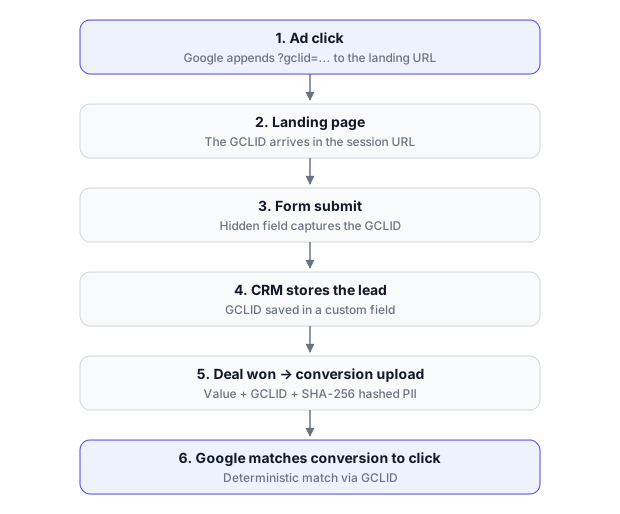
With Google Ads auto-tagging enabled, a landing-page visit may contain a gclid. Your form or tracking layer should persist it with the lead so it remains accessible when the deal reaches a later stage. The standard ActiveCampaign and Pipedrive connections prepare a GCLID field; other Google identifiers such as gbraid or wbraid require a separately validated compatible flow. The detailed implementation options are covered in how to capture GCLID in forms and CRMs.
True Conversions can also use normalized, hashed first-party identifiers such as email and phone. Match quality depends on the data available and the ad platform’s own records, so do not plan around a universal match-rate percentage. Server-side delivery reduces dependence on a later browser event, but it does not recover identifiers that were never collected, override consent requirements, or guarantee attribution.
Configure ActiveCampaign Offline Conversions
1. Audit the ActiveCampaign Pipeline
List the stages that represent actual changes in lead quality. Decide which single stage should be Optimize, which stages should only be measured, and which should not be sent.
Use stable, unambiguous stage names. The current ActiveCampaign and Pipedrive Journey setup matches configured stages by name, so avoid reusing the same display name for different meanings across pipelines.
2. Connect ActiveCampaign
In True Conversions, enter the ActiveCampaign API URL and API key. The connection validates those credentials, prepares the GCLID contact field if necessary, and registers the deal-update webhook automatically.
You do not need to create one automation per stage. The registered webhook receives deal updates, and the Journey configuration decides which stages are sent, measured, or ignored.
3. Configure and Test the Stage Names
Add the selected ActiveCampaign stage titles to the Journey exactly as the CRM sends them. Move one test deal through at least two configured stages and confirm that:
- both events keep the same deal ID;
- the received stage title matches the configured Journey stage;
- the associated contact supplies an email or phone; and
- the
GCLIDcontact field is populated when the lead originated from an eligible Google Ads click.
4. Configure Destinations
Connect Google Ads and, if needed, Meta. Create the required offline import actions in Google Ads first, using the appropriate Qualified lead or Converted lead category and enabling enhanced conversions for leads where required. Assign one Primary action to the Optimize stage and Secondary actions to any Google-bound Measure stages. A Measure stage may instead go only to Meta, or to both platforms.
For Meta, authorize the business, ad account, and dataset/pixel, then map each selected Measure stage to an appropriate Meta event. Meta CAPI delivery is live; Google and Meta are configured and evaluated as separate destinations.
Configure Pipedrive Offline Conversions
1. Choose Pipedrive Stages, Not Just Deal Status
Do not limit the integration to the final won status. Identify meaningful Pipedrive stage transitions such as qualified, discovery completed, proposal, and won. Select one qualification milestone as Optimize and use Measure for the other useful stages.
2. Connect Pipedrive
Authorize Pipedrive through the OAuth connection in True Conversions. The connection registers the deal-change webhook automatically and prepares a GCLID field on person records. True Conversions uses the authorized API connection to retrieve the person attached to each deal update.
The webhook may receive unrelated deal changes, but only recognized active Journey stages are delivered. Test, lost, and administrative statuses should remain ignored.
3. Verify Field Mapping
Move a test deal through at least two configured stages. Check that both events use the same deal ID, that the received Pipedrive stage name matches the configured Journey stage, and that the associated person contains an email or phone. If the deal came from Google Ads, confirm that the person’s GCLID field was populated at lead capture.
4. Assign Google and Meta Events
Use the same destination rules as ActiveCampaign: one Primary Google action for the single Optimize stage, Secondary Google actions for Google-bound Measure stages, and optional Meta events for Measure stages. Do not reuse the same Google conversion action across active Journey stages.
Conversion Value: Usually Leave It Out
The normal Journey setup does not send a monetary value. It does not assign percentages to funnel stages, multiply an average deal value, enrich a lead into a synthetic value, or restate earlier conversions as the deal advances.
There is one narrow exception: you may enable real CRM revenue for an eligible won/converted Google stage. The stage must use the appropriate won/converted Google action category, and the event must contain a real positive deal value. If revenue is missing, zero, or negative, True Conversions omits the value rather than substituting an estimate. Currency is sent only when a value is present.
This makes revenue an optional measurement field for a final Google milestone, not the basis of the normal setup. Do not assign artificial values such as $10 for MQL, $50 for SQL, and $500 for proposal merely to force value-based bidding.
Testing the Complete Flow
Test the integration before relying on live deal traffic:
- Connect the supported CRM integration and create a clearly labeled test deal with a unique email or phone.
- Move it into a Measure stage and confirm the automatically registered webhook is received and recognized.
- Move the same deal into the Optimize stage and confirm a separate delivery is recorded under the same deal ID.
- If Google is configured, verify the Optimize stage points to a Primary action and every Google Measure stage points to a Secondary action.
- If Meta is configured, verify the intended dataset/pixel and event mapping.
- Review True Conversions delivery status first, then the destination’s diagnostics. Platform reporting and attribution can appear later and should not be treated as immediate proof of matching.
For systematic diagnosis, separate receipt, processing, matching, and bidding impact. This offline-conversion troubleshooting guide explains why a successfully sent event may still not appear in campaign reporting.
Common Failure Modes
- Only
Wonis configured: earlier qualification signals remain invisible, and the final event may be too sparse or delayed to be the practical Optimize stage. - Several Google actions are Primary: the campaign can optimize toward mixed definitions of success. Keep exactly one Journey stage as Optimize.
- A Measure stage points to a Primary Google action: change that action to Secondary or choose the correct Secondary action before saving the Journey configuration.
- Stage names do not match: enter the ActiveCampaign or Pipedrive stage name exactly as received instead of guessing the label.
- The wrong CRM record is being updated: confirm that each stage change belongs to the same deal and associated contact.
- The click ID disappears before the CRM webhook: persist it at lead capture and verify that the CRM contact or person record contains it.
- No matchable identity is present: an event without a usable platform identity fails closed instead of being uploaded as an unmatchable conversion.
- The same Google action is reused: create or select a distinct action for each active Google-bound stage.
- Synthetic values are added to every stage: remove them from the normal Journey design; only eligible real won revenue is optional.
- A successful API receipt is treated as attribution: receipt confirms delivery, not person matching, campaign credit, or a performance improvement.
What to Expect After Activation
True Conversions handles ingestion, normalization, SHA-256 hashing, stage-level deduplication, destination routing, delivery records, and retries for transient Journey delivery failures. Google Ads and Meta still decide whether an event matches a user or click, receives attribution, and becomes usable by their optimization systems.
There is no universal conversion-volume threshold or fixed learning timeline that applies to every account. Evaluate the setup using the account’s own qualified-event volume, attribution windows, campaign configuration, and platform diagnostics. Correct event delivery is necessary infrastructure; it does not guarantee a bidding or performance improvement.
Next Step
Use the True Conversions server-side conversion setup to connect an ActiveCampaign or Pipedrive webhook and configure qualification milestones for Google Ads, Meta, or both. Start the free trial with no card required.